Tampilkan postingan dengan label review. Tampilkan semua postingan

Sabtu, 01 November 2014

Review Box net

Im an unabashed fan of Dropbox. In fact, when I wear my Dropbox sweat-shirt, I get random people walking up to me telling me how great Dropbox is. I havent seen so many unsolicited declarations of love for a corporations product since I started wearing Google shirts in 2003.

Nevertheless, once in a while I get chafed by the quota limits, and I have to check out the competition. I picked up a 50GB Box.net account a while back due to the Android promotion, and recently tried to use it to share videos that Steve shot on my GoPro camera during the trip.

Well, to cut things short, its a big major fail. The UI sucks, mostly because its tied to a web-browser. To be fair, Google made the same mistake in killing G-Drive and assuming that the web-browser was the future of all computer interactions. Dragging and dropping to the browser works, but using the browser to upload large files is stupid and senseless. Furthermore, theres a 2GB upload limit, which defeats the purpose of having a big quota.

Given how the interaction model completely misses the point of shared files, I predict that box.net will be unable to out-compete either Dropbox or Google. If they have an offer to buy the company, they should take it because they will not make it as an independent company.

Not recommended.
Read More..

Kamis, 30 Oktober 2014

Review The Temple of Gold

William Goldman, who wrote The Princess Bride, wrote The Temple of Gold as his debut novel. Im a big fan of The Princess Bride, so when I saw they shared the same author and Amazon offered it for a low low price of $1.99, I jumped on the novel and bought it.

I shouldnt have. This is an awful, awful novel. The lead character is unlike-able, and does so many stupid things that at one point I just stopped reading because I just couldnt stand reading a novel about someone this stupid. This isnt even about him being an anti-hero, this is just stupidity. For instance, he recognizes when someones really good for him in a relationship, but abandons the relationship anyway.

I eventually kept reading because I was stuck in a situation where I had nothing else to do, and kept hoping for a note of redemption in this novel. Unfortunately, there was none. Stay far far away from this book. I can hardly believe that the same person wrote The Princess Bride. Now I will hesitate to ever pick up another William Goldman novel again.

Read More..

Selasa, 28 Oktober 2014

Product Review Garmin GLO bluetooth GPS unit guest post

For 2 years or so, I’ve been using a track-recording app on my Android phone to plot my courses on cycling and running excursions. I’m a cyclist, but in the past 3 years I’ve added running to the mix of things I do. On cycling trips, a cyclecomputer will tell me things like ride distance, average speed in motion, etc., but there’s nothing easy to wire into my running shorts to get the same effect on a run. I got interested in tracking runs with GPS, and it snowballed to tracking rides that way as well pretty directly. I was already carrying my phone with me in case of emergency or mechanical failure anyway.

Also, in about the same time frame, I got more active in a social media scene, after Google+ launched publicly. Posting about a completed run or ride, including the exact track, has been a reasonably nice use of the platform. And for the morbidly curious, here’s my Strava profile. I typically log all runs there -- I can’t get good metrics on them otherwise -- but I only log notable or unusual bike rides.

Over time, though, I noticed a couple of problems with using my phone to lay down a GPS track:

  1. Recording adversely affects battery life. I’d get maybe 8-9 hours tops before the phone was nearly out of juice.
  2. On the phones I’ve recently owned [1], GPS accuracy is fairly poor. In fact, even staying stationary in the open, the GPS position will jitter.

Both of these factors conspire towards making one adopt a behavioral tic: when stopped for a considerable length of time, hit the “Pause” button on the GPS-track recording app [2]. When the ride or run resumes, unpause and resuming recording. Which brings us to another pair of problems:

  • Pausing the phone for every traffic light, 2-minute drinking break at a water fountain, etc., is a prohibitive pain-in-the-butt, so you’ll just have to accept the jitter sometimes.

  • At the long stops, where you do take the trouble to pause: will you remember to unpause the GPS app when underway again? It’s easy to forget!

It seems most people deal with these problem by buying a Garmin GPS-enabled cyclecomputer or GPS training watch. The latter would be a better choice if running is in the mix. I didn’t give this option too much consideration, though. I like the idea of having a smartphone with a reasonable amount of computing and interactive power recording my ride. I also like uploading activities to the web directly from the device. Tethering [3] my recording device to a full-sized computer at the end of my rides to do anything at all interesting with the data appears to be the usual option with Garmin, and it seems... less appealing. Maybe I’m just impatient, but I like to have the basic thing that I do with a ride taken care of on its completion, not as part of some post-completion task. Sometimes a post-completion task that I’d be hours away from being able to complete -- many of my runs and rides do not end at home.

Then I heard (from an office e-mail list) some prerelease buzz about the Garmin GLO. Part of the context of this discussion was “hey, the Garmin Connect software ecosystem is kinda poor; this would be a way to get good Garmin data without having to butt heads with the software.”  This is perhaps hearsay, though; I’d love to hear some more definitive opinions on that in the comments.

The GLO is a small external GPS receiver which connects to a client device via bluetooth. Speaking more accurately, the device locates and tracks GPS and GLONASS satellites; the latter is a parallel system to GPS, largely workalike, with roots in the old USSR aerospace sector. It is also the namesake acronym for the device. An Android or iOS device can be configured to use the GLO as its GPS data source rather than the built-in GPS hardware [4]. The GLO gets its initial GPS fix relatively quickly -- though more on this later -- and once fixed, updates its position at 10 Hz. (With a phone, you’d probably be lucky to get a 1-Hz refresh.) Advertised battery life is 12 hours between charges.

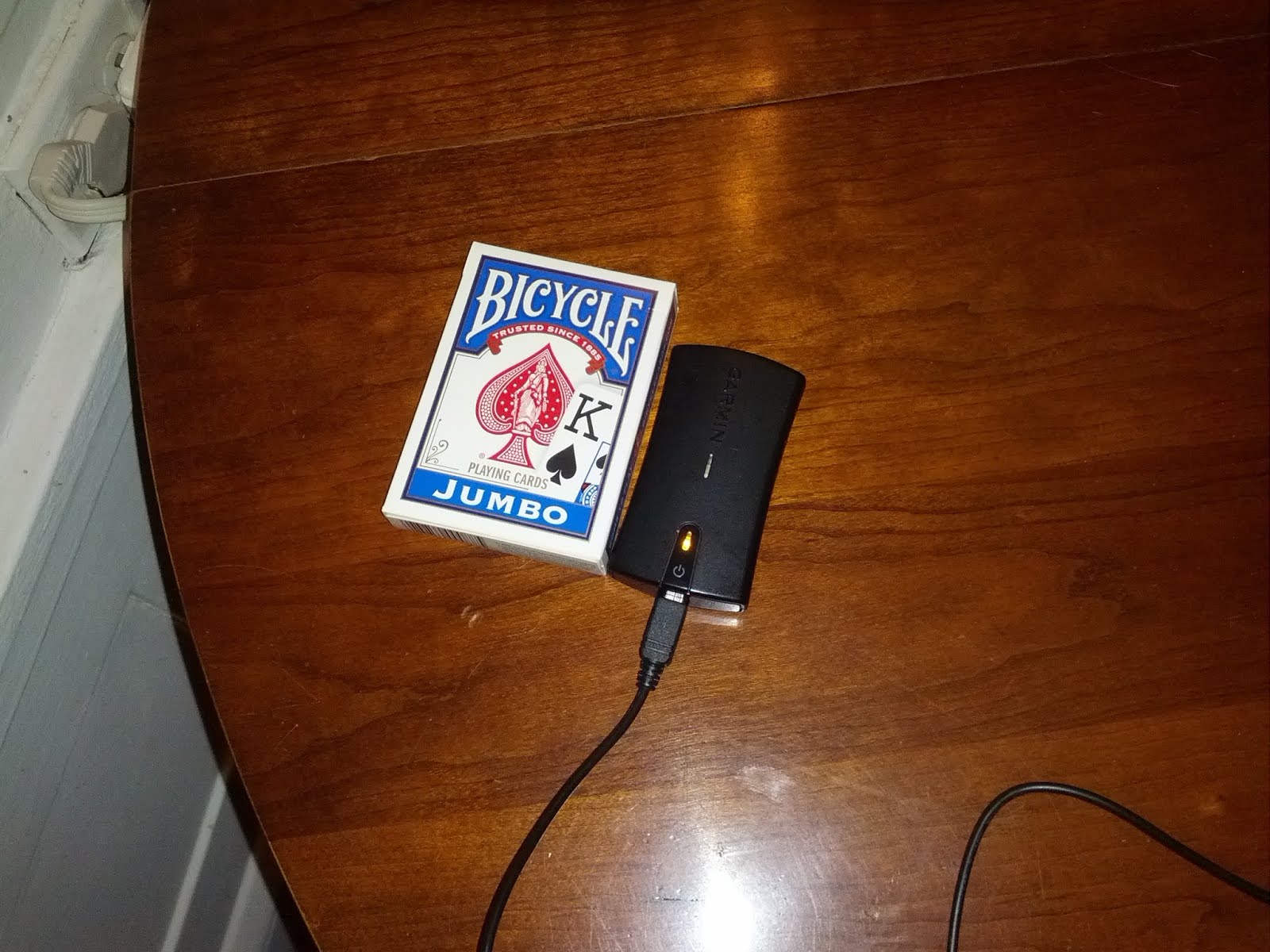
What does it look like? Here: next to a deck of cards, for scale. The GLO is slightly slimmer than the deck.

The middle LED monitors the Bluetooth connection between the device and its counterparty. The lower LED is a GPS signal and battery status indicator. It is mounted on a push button that turns the device on and off.

GPS accuracy with this device was hyped as being quite good. Great! The promise of that was enough to justify the $99 asking price alone. The next potential benefit: a bluetooth GPS unit could be good for phone battery life by offloading power-hungry GPS calls to an external unit (and battery) and substituting lightweight bluetooth calls in their stead.

I hoped that if the battery-life improvements were good enough, maybe I could generally keep the unit recording continuously rather than worrying about pausing at long stops and forgetting to unpause later on.

Setup Guide

Given that there’s no good guide for setting up this device with Android elsewhere on the web, and it wasn’t entirely trivial to figure out, here’s a quick how-to:

  • Turn both devices on.
  • Pair your phone and the GLO via the standard approach for bluetooth devices.
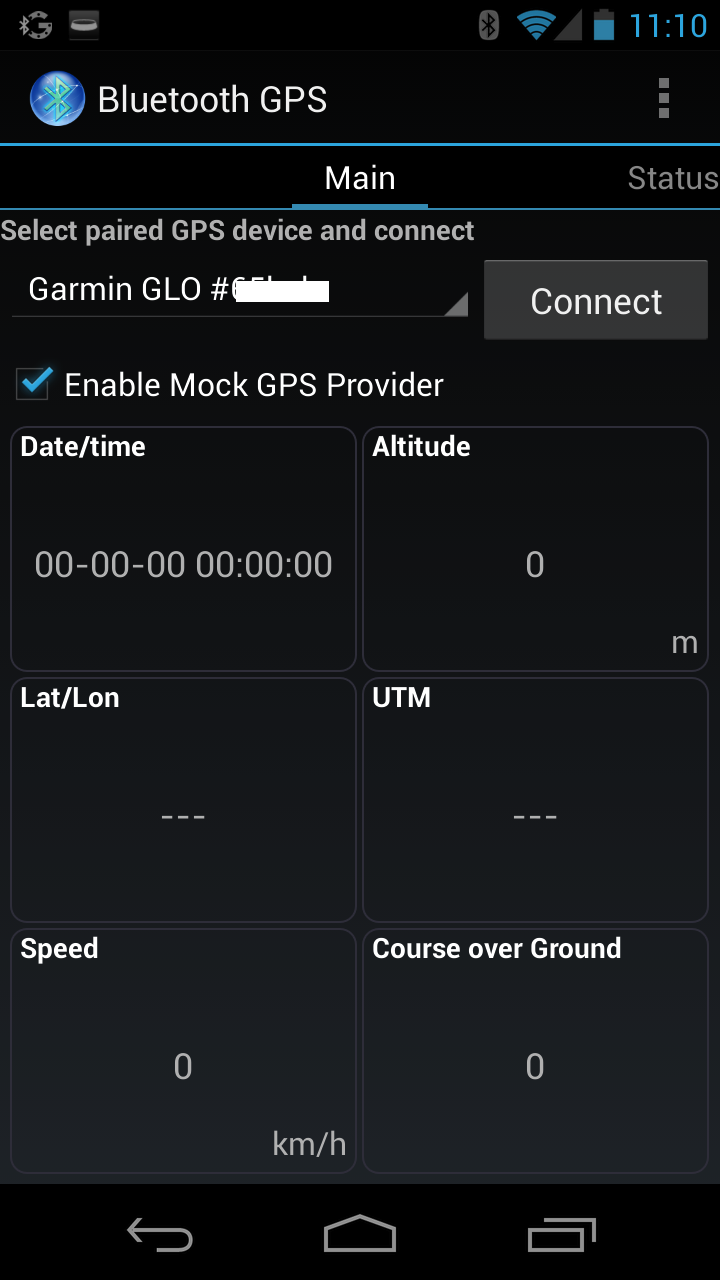
  • Install the Bluetooth GPS app onto the android device.
  • Launch the app
    • Go into the settings, and allow the phone to “Use Insecure Connection” (which isn’t checked-off/allowed by default).
    • Back in the Main App screen, check the box to “Enable Mock GPS Provider”. This will take you to a developer option in the phone settings.
    • Back in the Main App screen, touch the dropdown to select the source GPS device. It’ll be “Garmin GLO #6eadb” or something similar.

All of this is one-time setup. That done, connecting to the GLO is then just a question of launching the app and pressing the big “Connect” button.


I can’t directly comment on the setup process on iOS, though copy associated with the product makes me suspect it is less involved, as the device is specifically certified as compatible with Apple devices.

Initial Results


GLO accuracy is much better than base phone GPS accuracy. Here’s how a segment of my typical run to work looks if recorded with the base phone GPS (image taken from http://app.strava.com/runs/18462316):


and here’s how it looks with the GLO (http://app.strava.com/runs/19567252):

Much smoother, even scaled down a bit so as not to be unwieldy on this page, and generally much truer to my actual path. The GLO will still be off by a bit sometimes -- there are still lots of tall buildings in Manhattan, certainly -- but typically the egregiousness of this error is much reduced.

In fact, the built-in phone hardware was typically overstating the length of my runs by about 10%.

I haven’t yet completely run down the GLO battery in a single go, but the advertised life of 12 hours seems to be about right.

On the phone side of things, though, I wasn’t realizing the gains in battery life I was hoping for. Using the GLO was draining my battery more rapidly! Seemingly relatedly, my phone was warm to the touch after prolonged GLO-linked use.

Debugging battery life issues, and the solution


The first thing I checked was whether explicitly disabling the onboard GPS hardware made a difference when using the “Mock” source instead. This didn’t matter, though.

“Google Maps” was listed as the culprit application or process in the battery usage log, with the Strava App coming in distant second. Hmmm.

Then I noticed that for trips of 3+ hours, the Strava app would have trouble successfully uploading to Strava’s cloud servers at all. Digging into the underlying storage on the phone, I realized that the underlying .gpx files the app was creating were unusually large when using the GLO compared to without.

A-ha! The refresh rate on the GLO is 10 Hz, compared with maybe one update per second with the built-in hardware. How frequently does the Strava App poll for updates? Best as I can tell, it does so continuously, as fast as the device will allow for it. My conclusion is that the app was not engineered for the GLO’s speedy turnaround time, and was running itself (and my phone) ragged trying to keep up with all the updates.

Alas, the Strava app does not allow manually tuning the GPS refresh rate; it only offers ASAP behavior. MyTracks allows for tuning, though. I was able to reproduce the same battery drain & warmth effects with MyTracks at its default settings, but dropping the refresh rate down takes care of it immediately. Battery life was obviously improved with a 1-second polling interval, marginally improved further from there with a 2-second polling interval, and debatably improved again with a 5-second interval. Lately I’ve been using a 5-second interval.

With this tweak in place, battery performance seems to improve slightly over the non-GLO alternative, but not remarkably so. It’s still advisable to pause recording at a long stop [5].

Also, MyTracks’ introduction means that my workflow on the phone does not include automatic upload to Strava when the ride is done. Instead, I save the file to the device in GPX format, and then “share” the track file by email, To: upload@strava.com . It’s unfortunate. If I know a workout will be short, especially if I have means to charge my phone on the other end, I’ll often opt for the Strava app instead, heedless of the battery implications.

I’d also note that even if battery life weren’t at issue, pausing at long stops would still be good idea, if the stop involves a trip indoors. Movement indoors can cause apparent jitter in position even if there is none in actuality, as the GLO gets partial or reflected readings even inside the building.

Not just for run- and ride-tracking


I’ve also paired my phone with the GLO when getting ordinary turn-by-turn directions from the navigation feature of the Maps app. This has been helpful in gauging my position and upcoming turns more accurately. (With built-in GPS, sometimes my phone would lose track of me when driving, e.g., on the elevated Brooklyn-Queens Expressway and decide that I was on one of the parallel frontage roads or on an underlying avenue instead. Eep.)

Other quirks


The first time the device is turned on in a rampantly new geography -- out of doors, with a good view of much of the sky -- it takes maybe 20-30 seconds to get an initial fix on its position. I noticed this when the device was new, and again immediately after air travel. There have been a few instances of the latter. Shorter positional gaps during which the device was off -- between work and home, say, or the 35 miles between my own apartment and my parents’ house -- have delayed initial fix slightly, but less dramatically.

If I start to record an activity before I get initial GPS fix -- something I’d really like to be able to do freely, since I live in an apartment building -- the recording app seems to receive a few stray points from the last place the GLO had a fix on its position, which get inserted as junk data at the beginning of my overall track. If I don’t want to wait before getting underway, I can repair this after the fact by manually editing the .gpx file before loading it. It’s human-readable XML, so this is fairly trivial. Alternately, I may use the “Crop Ride” feature in Strava after upload, though this seems to be slightly too blunt an instrument.

The unit will flash a different pattern on the charging/fix LED if it is running low on power. IME, it will shut itself off soon after that. There’s no way to otherwise gauge the runtime remaining, except to charge it fully. I tend to do this even if I don’t think I need the full runtime, just to make sure the device is in a known state.

If the connection between the GLO and my phone goes sour mid-activity, I’ve found that I have to power-cycle the GLO before it starts serving data properly again. I’ve only seen this happen if I physically separate the GLO and the phone, though. For example, let’s say I lock up my bike and take my pannier, with GLO inside, into a cafe. I put the phone in my pocket. Then I leave the pannier with my family while going to the bathroom 20 yards & a door distant. Oops.

The power button requires a press (for a short count) to turn on, or a press and hold (for a long count) to turn off.  This makes it too easy for the GLO to “turn itself on” if put in a pouch or a pocket, and silently drain away its battery out-of-sight. I’ve taken to wedging a small piece of paper between the battery’s contacts and the pickups in the battery slot to keep the GLO off when I really want it off. At other times, I stow the paper harmlessly under the battery cover.

I also worry about the converse problem -- the device “turning itself off” -- but this hasn’t happened yet. In any case, a sliding on-off switch may have been a better design choice.

Conclusions


Despite the quirks, the drawbacks of the polling-frequency workaround, and the fact that phone battery-life improvements are marginal, I do like this device. Seeing smoothly-drawn track lines at the end of a ride or run is much more satisfying than seeing squigglies, and the improved distance accuracy for running trips is very valuable in its own right. It’s enough trouble that I don’t bother with it for ordinary rides to work, but I never bothered with tracking these rides before anyway.

I would probably enjoy using a GPS watch as well, if I had one. Prices are slightly less gentle than the $100 GLO -- figure $170 MSRP for a decent wired-data-transfer GPS watch, or $250 MSRP for one that syncs wirelessly, via ANT+ -- but that wasn’t really the blocking consideration. Mainly, I consider the necessary intervention of a computer to get the data off such a device to be a serious drawback, and I can usually get away without doing this with the GLO. I’d like the GLO even more if I didn’t have to be so careful not to trip over its many quirks, alas. And if these quirks weren’t sometimes easiest to remedy with, in fact, computer intervention.

If you think you might be of a similar mindset, give the Garmin GLO some consideration.


---

[1] GPS accuracy on my current phone, a Samsung Galaxy Nexus, is poor. My previous phone/current backup phone, a Samsung Nexus S, is even worse.
[2] The Strava app has had a “Pause” button as long as I’ve used Strava. MyTracks finally added one a few months ago.
[3] Yes, I realize many devices can communicate wirelessly via ANT+ and don’t require a literal tethered USB cord to transfer data.
[4] Some Android and iOS devices even lack built-in GPS entirely. The most notable examples are wifi-only Apple devices, such as the iPod Touch and the wifi-only iPad.
[5] Lately I’ve been playing games to remind myself to unpause recording before I proceed. The latest: I’ll stash my phone somewhere on my person that I usually don’t -- in a jersey pocket instead of its usual spot in my pannier, for example. When I ask myself later “Hey, why did I take this out of the pannier?”, it jogs my memory. "Oh, right, I need to hit unpause before I put it away."
Read More..

Sabtu, 04 Oktober 2014

Review Cowl

Cowl is Neal Ashers time travel novel. The novel, not set in his Polity universe, follows two characters, a government trained special agent named Tack and a former prostitute named Polly as they get pulled back in time by organic time travel devices intended to bring them back to a mysterious creature named Cowl at the beginning of time.

The mechanism behind time travel is never fully explained, though the unique thing that Asher does here is to view history as a series of probability curve, and explaining paradoxes as pushing a particular group of events up or down a probability slope.

The characters arent very likable, though we start to sympathize with Tack after we realize that he was effectively a programmed assassin and a pawn. What I dislike about the book, however, is that the characters dont seem to have much agency at all. Tack gets dragged this way and that by factions of time travelers and never gets much agency until right at the end of the book. Polly just keeps jumping backwards in time continuously without any agency at all either. So that makes the book a slave to the plot, the reveals, and the world.

Unfortunately, the plots complex, but the reveal isnt all that interesting. The villain turns out not to be that much of a villain, but is still not a nice guy either, and the wrap up is just full of pyrotechnics for no particular reason. Im not sure what Asher was trying to achieve, but his attempt at a cerebral time travel story with lots of action falls a bit short of his Polity novels, which at least have some sort of coherence to the violence.

Not recommended.
Read More..

Selasa, 30 September 2014

Review Grand Pursuit The Story of Economic Genius

Ill admit it. Im an economics junkie, and enjoy even reading books like Minskys Stabilizing an Unstable Economy. So I was excited when Sylvia Nasar of "A Beautiful Mind" tackled the history of great economic minds in Grand Pursuit.

By far the biggest disappointment is that with only limited space and spanning this much time, Nasar could only grant superficial coverage of many of the ideas. I was even more annoyed when she insisted on wasting precious pages on boring genealogy details rather than the big ideas of the man.

That said, Nasar does a passable job of describing economic history. Her description of Karl Marx as a person whod never bothered to learn English despite writing his book there, and who never even visited a single factory to do his work. Several not very well known economists are covered, including Alfred Marshall, Beatrice Webb, and Joan Robinson. Strangely enough, she never talks about Adam Smith except in passing.

By the time we get to the greats like Schumpeter, Keynes, Friedman, and Samuelson, the repeated mini-biographies are starting to wear thin. However, this is where the action starts, so I was quite perked up. I learned quite a bit more about Keynes that I didnt know before. Nasar also "gets" Keynes, though she doesnt quite take the pains to explain why Keynes General Theory was widely misunderstood, even more so than say, Einsteins.

The war years are covered in great detail, though big breakthroughs (like Irving Fishers realization of the relationship between interest rate, the business cycle, and inflation) dont quite get the headline attention they deserve: sometimes you feel as though Nasar is more interested in Keynes bi-sexuality than in his ideas.

What does come across to me as brand new information is the section on Hayek. For instance, he and Keynes were friends and supported each others work. Hayek is definitely not the libertarian that his later followers make him out to be, and Nasar delights in pointing that out, especially when Republicans tried to court him and get his approval.

Ultimately, while the book was worth reading for me, I wonder how many non-economics junkies will be able to keep their eyes open during the long diversions. Not really recommended.
Read More..

Minggu, 21 September 2014

Review Cure Your Child With Food

Cure Your Child With Food is a book about nutrition and the impact nutrition has on childrens health and growth. Its an interesting book in that its organized with each chapter meant to be read independently, which leads to a lot of repetition.

For instance, my impression of the first half of the book is that shes a one-trick pony. She seemed to have only two solutions for the patients who come to her: get rid of the diary in the diet, and ditch the gluten. Get rid of the American "white diet". Thats it.

The second half of the book, however, does demonstrate that she doesnt just prescribe one thing for all patients. For instance, one patient came to her with sleep problems and an otherwise healthy diet. Getting her onto 0.5mg of melatonin supplement an hour before bedtime meant she could sleep through the night. She explains why melatonin is a good solution and why it is not addictive. Another patient came to her from a vegetarian background with muscular development issues. Adding choline and fish oil to his diet resolved his issues. She does caution that sometime fish oil by itself isnt enough and that other forms of intervention are required. She diagnosed one case of a patient ingesting pesticide from fruit.

She presents interesting theories about why theres been a recent rise in gluten sensitivity (not the same as celiac disease): the amount of gluten in wheat that has been harvested has gone up, due to "improved breeding" and other interventions. She also explains why she recommends fish oil supplements over just adding more fish to the diet: the risk of mercury poisoning.

While the book is wordy and repetitive, I found it useful in thinking about childrens nutrition. For instance, once you take your kid off infant formula, you should think about where his Omega-3 is going to come from. In our case, it was more palliative than anything else, but its not quite a "one trick pony" book that the first half of the book presents itself to be. Recommended.

Read More..

Rabu, 10 September 2014

Firefox 6 0 Review

From: PcMag

Pros
Minimalist user interface. Panorama tab group organizes sites. Excellent standards support. Cool bookmark organization with Panorama. Pinned sites for all-the-time access. Syncing for tabs, history, passwords and more. Graphics hardware acceleration. Cross-platform.
Cons
Update breaks some extensions. Still trails Chrome and IE9 on some benchmarks. Lacks client-side tracking protection like that of IE9. Lacks Chromes built in Flash, PDF reader, and Instant page view. Trails Chrome in HTML5 support. No new-tab page helpers. Slower startup than Chrome and IE9.
Bottom Line
Firefox remains a lean, fast, customizable browser that can hold its own against any competitor, especially with its graphics hardware acceleration. The version number bump doesnt mean what it used to though, with no major user feature adds from version 5 to 6.


Firefox 6, the latest web browser version from the open-source Mozilla Foundation, brings very little that end users will notice—the big interface changes all came along in version 4. With Firefox 5, Mozilla started emulating Googles Chrome (free, 4.5 stars) Web browser in more than just JavaScript speed and minimalist interface, as competitors Internet Explorer 9 (free, 4 stars) and Opera 11 (free, 4 stars) have. The open-source organization even adopted the mammoth search companys rapid version-release pace, and Firefox 5 was the first fruits of this approach. A new Firefox version will now come out every 6–12 weeks, and only features and fixes that are ready will make the cut.

That doesnt mean Firefox 6 is an insignificant update: A look at the change log shows a whopping 1,300 bug fixes (which includes feature and developer tooling adds). Some may notice that, like Chrome, Web addresses now have the site domain name in a darker font than the rest of the extraneous parts of the address. They may notice faster startup time if they have a bunch of Panorama tabs loaded. In addition to the changes noted above, the latest version includes a new site-specific privacy settings page, which you can access by typing about:permissions. The site identity area on the left side of a Web pages address has also been slightly redesigned.

The vast majority of whats new in Firefox 6, however, will be of greatest interest to developers. Chief among these are support for the latest version of WebSockets, which allows sites to perform bidirectional communication with a server; EventSource, for server-sent data—(i.e., push); Scratchpad, an interactive JavaScript prototyping environment; and (something astute end users may see) more options in the Web Developer menu from the main Firefox button (including the Scratchpad). Version 5s foremost adds were support for HTML5 CSS transitions, and a more visible Do Not Track choice. Mozilla made the anti-tracking option more prominent in Firefox 5, and claims its the first cross-platform browser to include such a feature. But keep in mind, all it does is set a header entry telling sites you dont wish to be tracked, so its up to the trackers to abide by your wishes. IE9s corresponding feature, by contrast, actually blocks the tracking on your end.

Firefox can nearly match Chrome on JavaScript speed, even currently beating it in 3D graphics acceleration, holds its own when it comes to HTML5 support, and offers a trimmed down interface that gives the Web page center stage. But when you hold it side-by-side with Chrome, Firefox falls just a bit short in terms of HTML5 support and whiz-bang features like Chrome Instant, which loads pages from your history before you even finish typing their addresses or search terms in the address bar.

Install
A simple 13MB download gets you the Firefox 6 installer. When you run it youll lose your old version of Firefox, so make sure youre ready to say goodbye to 4.0 (we hardly knew ye). The latest Firefox is available for Mac and Linux as well as for Windows 7, Vista, and XP—the last of which even Internet Explorer 9 (Free, 4 stars) cant claim. You can import bookmarks from any other installed browsers on first run, but setup is nearly as uncomplicated as it is for Chrome. Firefox also now makes it easy to choose a search provider other than Google, but surprisingly, not as easy as Chrome does.

Its more likely that youll be updated to version 6 automatically, though, since, starting with version 4, Firefox followed Google Chrome in yet another way: by automatically checking for and downloading each new version, and installing it the next time the browser starts. This has the benefit of keeping the majority of users on the latest version.

One downside to updating, however, is that some add-ons (particularly 3rd-party extensions) wont be compatible with the new version. I ran into this with two of my installed extensions (Java and Skype), and I dont have a huge amount installed. At least Mozilla has put into place a system for automatically re-enabling your add-ons once theyre updated. This phenomenon to this set of users in the form of a discussion group, the browser maker has made it clear that the vast audience of individual Web users is their priority, not corporations.

Interface
Firefoxs latest interface brings it in line with the trend of "less is more"—less space taken up by the browser frame and controls and more space for Web pages. The page tabs have moved above the address bar, and, as with Opera 11 (Free, 4 stars), theres just a single menu option in the form of the orange Firefox button at top left. You can re-enable the standard menus by hitting the Alt key. The Home button has moved to the right of the search bar, and a bookmark button appears to the right of that. That bookmark button only appears when you dont want the bookmark toolbar taking up browser window space. This gives you one-click access to frequently needed Web addresses. But I wish that, like IEs star button, it also let you see recent page history. You can still call up the full bookmark manager, which lets you do things like importing bookmarks from other browsers, search, and organize.

Firefox is one of the last remaining browsers to still use separate address and search boxes, which is good for those who like to keep those two activities separate. That doesnt mean, however, that a search wont work in the address bar, aka the "awesome bar." That tool, which drops down suggestions from your history and favorites whenever you start typing, was pioneered by Firefox and copied by all other browsers. The Firefox version now adds a new twist: When one of its suggested sites is already open in a tab, you can click on a "Switch to tab" link, preventing you from unnecessarily opening more tabs unnecessarily—a useful tweak.

Panorama and Pinned Tabs
With version 4, Firefox brought a revolutionary new way to organize tabs. Dubbed "Panorama," this feature helps those who like to have lots of tabs open. Just click the Mondrian icon all the way to the top-right of the window, and youll see rectangles containing page thumbnails. You can drag tabs between groups, and resize and move the group boxes themselves around. You can even give a name to a tab group to keep organized.

When you click on a page thumbnail in any tab group, that page will maximize in the browser window, and youll only see tabs from its group. It takes a bit of a rethinking, as you wont see all of your pages tabs, but a click of the group icon gets you to them. I only wish that Panorama had some automation of the group creation, similar to IEs color grouping of tabs. And unlike Operas nifty stacked-tabs, Firefoxs groups are a click away on their own page, rather than always in front of you.

Another tab-related feature seems clearly Chrome-inspired—pinned tabs. If there are sites you always want access to, just as in Chrome, you can pin their tabs to the left side of the tab bar. These pinned tabs appear narrower, showing just the site icon. The pinned sites will also load automatically when you start Firefox. But you cant create an app shortcut icon for use on your desktop or Windows 7 taskbar, as you can with IE9 and Chrome.

Firefox Sync
Chrome and Opera have had bookmark and settings syncing for a while, but Firefox does an excellent job at implementing this on-the-go convenience. Not only will Firefox sync bookmarks and settings, but it also opens tabs, history, passwords, and forms. The data is encrypted locally so that no one can intercept those passwords while theyre on their way to Mozillas servers. The setup creates a key that you need to enter into the other PCs you want to keep in sync; the process isnt arduous, but its not as simple as Chromes sign in. One thing you cant sync in Firefox that you can in Chrome, though—surprisingly—is extensions. Themes, are another, but Chrome cant sync History or open tabs. IE9 has yet to offer any syncing option. Im still occasionally amazed to see the same page I was viewing at work 45 minutes ago magically waiting for me on my home copy of Firefox. Version 6 improves discoverability of Sync by adding a Learn More link to the Add Bookmark and Remember Password dialogs.

Add-ons (aka Extensions)
Since version 4, add-ons (which includes third-party extensions) have been revamped inside and out in Firefox. The Jetpack add-on system is both easier for developers to create extensions and easier for consumers to use them. JetPack makes it possible for an extension developer not to require a restart to install the add-on and to make updating less intrusive. Jetpack could save me a lot of frustration when I just want to get browsing. But I still found that even in version 6, a lot of extensions still required a restart, and the frequent browser updates increase chances for incompatible extensions whose creators havent updated their code for every Firefox update.

Interface-wise, in another nod to Chrome, Firefoxs add-ons manager now resides in what looks like a Web page. In its present form, its a little harder to simply find the most popular extensions and their ratings, but you can still head to the Mozilla Web page for this. Firefox is still customizable in appearance, too, thanks to Personas and Themes.

Specifications
Type
Business, Personal, Enterprise, Professional
Free
Yes
OS Compatibility
Windows Vista, Windows XP, Linux, Mac OS
Read More..

Senin, 01 September 2014

MSI Radeon 6870 HAWK Basic Review


Incredible performance of HAWK series.. The card looks promising... I hope they have long enough warranty for the enthusiasts to mod them more like crazy..


It is quite interesting to see that there is an extensive shift towards the more high-end and enthusiast products in the past year or so. It seems that next to good performance and features, the end-users like to tweak more and more as well. Well that and they want the "good stuff". MSI is exhibiting that on all fronts, with their motherboards but of course also with their graphics cards.

And even when a graphics card is segmented in the mid-range .. they know precisely how to pimp it up in order to bring you a very attractive product at an okay price. Yeah, rock-solid designs with no compromises at all. In that context MSI just released their HAWK edition Radeon HD 6870 graphics card and well, the only thing left original is the actual GPU as everything else was changed.


It doesnt end there though, MSI is pre-overclocking this 1024MB HAWK model towards 930 MHz. And then theres the overclock potential, a new voltage regulation circuitry was embedded, allowing not only to play and tweak around with GPU voltages, nope ... they added voltage control for the memory and Auxilary/PLL voltage as well.

As a result this graphics card can get overclocked to 950 MHz easily, and if you apply a little voltage tweaking with the help of Afterburner, 1 GHz is without doubt a threshold you can pass. All in all definitely something you want to check out.

Within its own lineup the Radeon HD 6850 will be faster than the Radeon HD 5830 and the Radeon HD 6870 will be faster than the Radeon HD 5850, but not faster than the 5870 . The Radeon HD 6870 will be a pure reference product, while the Radeon HD 6850 will see many custom designs and boards. In the end it will be all about pricing of course.

Lets have a quick comparative overview of some of the specifications representing a certain cope of mid-range performance products.


Theres no way around it, the R6870 HAWK is a very impressive product. See, the reference R6870 all by itself is obviously already a great value product that offers good performance. MSI upped that up a notch by the (though petit) standard overclock.

The HAWK however is not about that shy standard overclock, its about build quality, sturdy and cool looks and sure, the exemplary cooling. The new TwiNFrozr III cooler definitely managed to impress me. With the help of a little switch you can setup the silent or performance mode and yeah, the card even at the performance mode switch remains silent while keeping GPU temperatures below 65 Degrees C under full load, thats just good.

Combined with the latest revision of MSI AfterBurner you can tweak the card much further though. Without voltage tweaking youll reach say 950~975 MHz on the graphics processor core. But really, when you buy a card of this caliber and do not apply even a little extra voltage on the GPU, well it would be a shame really. At 1.25V you will be able to pass that 1 GHz barrier, in fact we reached 1044 MHz on the GPU completely stable. Small tip, if you decide to tweak with added voltages, please bare in mind that you should only increase the voltage when needed.

We got the gDDR5 memory clocked (effective data-rate) to 4800 MHz stable as well. These two tweaks ensure you gain another chunk in performance.

The HAWK as such is an exemplary product in many ways, the problem with it is the recent price drop and introduction of the R6950 1GB, you can purchase that product at 230 EUR already, and thats the same price as the HAWK. At default that product is at least as fast or slightly faster and that might hinder the HAWK as GPU specs wise, the 6950 1GB is simply more advanced. But as you have been able to see, performance wise youll have noting to complain about, pretty much any game up-to 1920x1200 will run just fine with a decent set of image quality preferences enabled. The R6870 is a nice success story, and the HAWK brings it a level higher.

If you can find the MSI R6870 HAWK for the right price, we can wholeheartedly recommend the product. The sheer design and quality components alone make this an awesome product, and is something that the more tweaking and enthusiast crowd will like very much.

Definitely recommended for your average hardware tweaker.


Source: http://www.guru3d.com/article/msi-radeon-6870-hawk-review 
Read More..

Sabtu, 30 Agustus 2014

HP dm4 3000ea Notebook review


HPs Pavilion range was never going to offer the same wow factor as its premium Envy line and we couldnt pick out its previous dm4 Pavilion in a line up. But HPs new dm4-3000ea Pavilion Beats Edition is far from anonymous.

HP dm4-3000ea Notebook review
Thanks to the ubiquity of Beats Audio technology, HP has decided to give its non-descript dm4 Pavilion a chassis overhaul and specs update. That upgrade does bump up the price to £849, so its not the very best value for money, but the Beats redesign is a success for various reasons. It looks super-modern without being too cool for school, enjoys a solid feel for a 14-inch multimedia portable and – most importantly – it sounds absolutely fantastic.

Punching above its weight

Despite its slinky dimensions (338 x 225 x 32 mm), the dm4-3000ea is fairly heavy. A weight of 2kg for such a small chassis is surprising, but every component – including the great backlit keyboard – feels robust and well-made (although its not the solid mag-alloy chassis that HP puts in its Envy laptops; just serviceable plastic here).

The board marries the same soft red and matte black hues that adorns the case. The Beats logo also sits front and centre, which could annoy, but the font design is so nice it actually really works.

It can be hard to type on dinkier laptops keyboards, but the dm4-3000ea Pavilion Beats Edition is the exception to the rule . It felt much better than the first dm4 Pavilion board and has isolated chiclet keys with a solid bounce.

HP has also binned the miniature navigation keys, making it fine to use for long periods for multi-tasking and browsing online. Our only bone of contention was the unresponsive touch tech on the trackpad which is still a novelty.

HP also gets bonus points for adding one of the better in-built webcams available.
The 14-inch display is powered by 1366 x 768 LED-backlit BrightView screen, which works perfectly well in most brightness conditions. Its not over-glossy and coped admirably with the darker hues of The Dark Knight. We also had no problems streaming high-definition video content. Clearly, the HP dm4-3000ea Pavilion Beats Edition wont have any problems performing most multimedia tasks.

HP also gets bonus points for adding one of the better in-built webcams available. Thanks to the TrueVision low-light tech, it managed to pick us out accurately enough in murky lighting.

Under the hood

The rest of the specs under the hood are decent enough to make sure HPs dm4-3000ea Pavilion Beats Edition didnt suffer any staccato playback – even on number crunching apps.

HP has bundled a 2.5 GHz Intel Core i5-2450M processor, a 500GB SATA hard drive and 4GB of memory with space for two more sticks if you fancy an upgrade. That should be enough oomph to boot the OS from cold in no time at all… but, irritatingly, HP has added the usual bloatware gubbins to slow everything down. That said, some of the pre-loaded software, like Norton and Windows Office Starter Edition is actually useful.

Performance in our lab tests produced steady if unspectacular results, especially when you consider the power available from that Intel Core i5 chip. A score of 5629 in our processor benchmarks means that its more than adept at multitasking, but it does seem low when compared with laptops such as the Packard Bell TS11 which achieved better lab tests.

Graphics were equally unspectacular, and we also got a mid-range score of 5622 in our 3D Mark tests. This is enough for light gaming, thanks to 1GB of dedicated graphics on its AMD Radeon HD 7470M GPU. Just dont expect to get anything out of Battlefield 3 or Modern Warfare 3, though.

The 174-minute battery life using Battery Eater Pros Readers Test was pretty good – especially when you bear in mind that it has a 6-cell battery.
So, the question remains, how do you get enjoy audio fidelity on such a small laptop? The simple answer is to plug in decent headphones and bypass the traditionally tinny laptop speakers.

If youre not a fan of headphones, a more permanent solution is to upgrade to superior audio components.

While the Beats audio results good, you still cant been hooking up a decent set of speakers. That said, for audio on the go, the dm4-3000ea Pavilion Beats Edition comes highly recommended – and HP even throws in a pair of Dr Dres Solo headphones as part of the package.

Overall the HP dm4-3000sa is a capable portable laptop, for those who want style while theyre on the move. Admittedly, its not packed with power, and there are lighter machines for the money, but the Beats credentials give it cool credibility that will attract students and younger users.

Anyone who does invest will be rewarded with a solid performer capable of work and play on the move, but those with demanding needs will want to look at portables backed up by a bit more grunt.

Enhanced by Zemanta
Read More..

Sabtu, 12 April 2014

REVIEW ON LAVA Z7H TABLET


Bought this tablet before 1 month @5200/-. The worst electronic gadget I have ever bought in my life with a less price. What to expect with such a small price.

On day 1 the tablet becomes hang on boot screen. After coming from service center new problem found. Charging upto 99%. Backup upto not more than 15min. :(


Advantage-
1. Can play all video formats of every resolution. (also 1080p)
2. Good touch response.
3. Good ram size.
4. Nice internal memory 504 MB + internal SD card 2.32 GB free with it.
5. Nice multi-programing.
6. Android ice cream sandwich os :)
7. Already rooted. (can be rooted perfectly here)
8. My local LAVA Service Center respond me well and have given me the best service.

Thats why I bought LAVA E-Tab Z7H+.

Disadvantage-
1. Hardware is very poor quality.
2. If you install go launcher the tablet becomes laggy. Live wallpaper consumes more memory.
(No Electronic gadget is perfect.)

Rating (3/6)

Suggestions-
1. You can buy this as all the software solution is given here.


Read More..

Jumat, 11 April 2014

Review Six Earlier Days

Six Earlier Days is a short prequel to David Leviathans novel, Every Day. Its a light fast read, but doesnt have the heft or development of the novel. It brings together 6 different days of As life, some of which reveals a facet of his character, and two of which foreshadowing the events to come in the novel. I can only recommend this book if you read Every Day and wanted more.
Read More..

Minggu, 06 April 2014

Review Wheat Belly

My doctor actually recommended Wheat Belly, or I wouldnt have picked it up. Cure Your Child With Food, for instance, already mentions that gluten, the protein in wheat, is the source of many digestion problems. That book reported loads of success curing kids by eliminating wheat and anything white from their diets.

The Wheat Belly proceeds to blame almost all modern ills on wheat and wheat products. As in Cure Your Child With Food, he claims that wheat has been so genetically engineered or otherwise manipulated that the nutrition in it is not something that your body can absorb or deal with, leading to a bunch of diseases ranging from diabetes to acne (!!) to early balding in men. The book is replete with anecdotes from his practice where the patient is miraculously cured after eliminating wheat from his or her diet.

Unfortunately, things are not that simple. You see, Doctor Davis doesnt just recommend getting rid of wheat. He recommends eliminating all forms of whole grain and potatoes as well as the sugary fruits. Adopt his program wholesale and what do you get? The Atkins diet. If wheat was the all encompassing evil he claims it to be, then there shouldnt be any need to eliminate all the other foods, so this prescription basically undermines the entire first 2/3rds of the book!

Now, it could very well be that gluten sensitivity (not necessarily celiac disease) is far more prevalent than you might think, and that many people with irritable bowel syndrome could benefit by eliminating wheat. But if youre looking for proof that wheat is the culprit, then this book definitely does not provide it. That said, he does reference lots of interesting data, including Denise Mingers excellent debunking of the China Study. Theres a lot of interesting information, though again, since he undermined himself in the last 2 chapters of the book Im not sure how much Id be willing to believe anything he says.

Not recommended.

Read More..

Selasa, 01 April 2014

Review The Newlyweds

The Newlyweds belongs in that category of mainstream fiction known as the immigrant womans narrative. Its considered an important literary art form, though unfortunately its become so cliche that you can list the tropes as a series of checkboxes and watch the author clicks through them one at a time.

This book is a typically cliched example of the genre. The protagonist is a Bangledesh woman (about 10 years ago, it would have been a Chinese woman via Amy Tan or Maxine Kingston Hong) who marries an American engineer and comes to the USA to start a new life. Theres the culture shock moments, theres the clash of religions/expectations, and theres the woman itself: she has next to no skills, and arrives penniless, and is wholly dependent on her software engineering husband. How about once in a while we get a protagonist whos capable of getting a green card all by herself for a change?!

The narrative revolves around the woman (for a change, I would also like to see someone write about the male immigrants, but I guess theyre all too busy being successful software engineers for someone to bother writing about their experience), and the discovery that her husband-to-be had lied to her before the wedding. In the grand scheme of things, these are small lies, and theyre lies of omission, rather than lies of commission. Ive heard of much worse stories in the Asian community. But in this genre, the smallest thing can be blown up into the biggest issue, because thats how the genre works. More importantly, the book is predictable right down to the ending: at no point does the protagonist make an attempt to effect her life in a positive way, or gets over her sense that shes at the center of the universe.

Towards the end of the novel I found myself flipping pages forward out of boredom. I was not surprised that at no point did skipping entire chapters cause me to lose sight of the plot --- thats how slowly the book moves, and how many worthless digressions are woven into the story.

If you enjoy this genre, I suppose this book might be interesting to you: the author is capable of putting together decent prose, and has a good grasp of Bangladeshi life. I cant tell how authentic this is or how well the authors done her homework without putting more effort into this book than it deserves. For all others whove read at least one book in this genre, I suspect that the book will feel ridiculously familiar.

Not recommended. Go read some science fiction instead. At least thats one genre where competent women protagonists are not excluded.
Read More..

Jumat, 28 Maret 2014

Review The Immigrants

The Immigrants is a novel set in the Greater San Francisco Bay Area. For some reason, San Francisco has yet to have its Raymond Chandler, (Wallace Stegners amazing Angle of Repose notwithstanding) and unfortunately, Howard Fast isnt all that great a writer.

However, I found the book itself compelling reading. It follows the story of Dan Lavette, who as a young man was orphaned by the great San Francisco earthquake of 1906. While he lots his parents, he made a ton of money with the boat his father left him, ferrying people to and from Oakland during and after the days of the disaster. With this, he expanded his fishing fleet, and eventually became a transportation tycoon, along the way picking up a beautiful wife, a mistress, business partners, friends, and enemies. The book ends right after the 1929 Great Depression started, granting a view through the broad sweep of history that the book encompasses. This was a time of history when cutters gave way to powerboats, when railroads were the principal mode of transportation. World War I and its after-effects were widely felt, and inflation became widespread.

What kept me reading was that the author clearly knew the San Francisco Bay Area really well. We get exposed to San Mateo, Menlo Park, Sonoma County, and the environment all during a period of time when $12/day was a princely sum. We get a good view of how hard it was to be a Chinese immigrant during that era. We get to see the prohibition and some of its effects. The weakest part of the novel are the characters. The protagonist, Dan Lavette, is barely fleshed out. His relationship with his estranged wife is described in a few bare sentences, so one is left having to make the leap from the passionate courtship to the estranged marriage with no way to connect the dots. Even the authors attempt to create a non-stereotyped Chinese woman is still weakened by his need to bend everything to his plot, resulting in a barely believable thing for an otherwise strong willed character to do. Ultimately, one sees Lavette as a "Mary Sue" character, one who right until the edge of the Depression, makes all the right decisions with the benefit of hindsight.

If you want literature, read Wallace Stegners Angle of Repose. Even for an airplane novel, The Immigrants is fun enough, but leaves one feeling empty. Im unlikely to bother looking at the rest of the 6 book series.
Read More..

Kamis, 27 Maret 2014

Asus RT N56U Router Review

Asus RT-N56U Router Review

In recent years, Asus has slowly but surely become one of the computing industrys best brands, offering a wide range of products with market-topping performance at reasonable prices. Can it bring that ethos to the world of routers too?


Well, you only have to look at the Asus RT-N56U to get an idea of whether or not its possible. This is a router that has been redesigned from the ground up to throw off the shackles of the traditional, box-and-aerial form factor and come up with something that looks stylish, maybe even artistic. The wireless is multi-channel, but theres no way to tell by looking, because the antennas are discreetly embedded in the devices fascia: two for 2.4GHz and three for 5GHz.

Its no slouch technologically speaking either, with wireless N capabilities spanning both the 2.4GHz and 5GHz range (the latter is absent from cheaper routers), four gigabit LAN ports, a cable-ready WAN port and the usual selection of security features and configuration options available through an easy-to-use web interface. The WPS fast-setup button means you can create a secure connection to a compatible OS (Windows 7, for example) without the need to type m tedious WPA keys.

The best feature, however, is the USB compatibility, which allows you to attach storage (so that the router can double as a media streaming centre), 3G dongles (to share mobile internet connections), printers, and many other devices. Theres even a BitTorrent client!

If theres a problem, its only the price. If you dont expect to use the extra features, its no better at actually handling traffic than any other router, especially once you factor in the likelihood that wireless N speeds will be lower than quoted if you go with the more easily absorbed 5GHz frequency range.

Still, we were impressed. If you want something a bit more capable than entry level, with solid network performance, fantastic design and impressive additional features, its perfect. Asus has done it again.

Expensive as a router, but it looks great and you cant argue with the extra features


Specifications

  • Network Standard
    IEEE 802.11a, IEEE 802.11b, IEEE 802.11g, IEEE 802.11n
  • Product Segment
    N600 advanced performance; 300+300Mbps
  • Data Rate
    802.11a : 6,9,12,18,24,36,48,54Mbps
    802.11b : 1, 2, 5.5, 11Mbps
    802.11g : 6,9,12,18,24,36,48,54Mbps
    802.11n : up to 300Mbps
  • Antenna
    Internal dBi antenna x 5
  • Operating Frequency
    2.4GHz/5GHz
  • Encryption
    64-bit WEP, 128-bit WEP, WPA2-PSK, WPA-PSK, WPA-Enterprise, WPA2-Enterprise, WPS support
  • WAN Connection Type
    Internet connection type : Automatic IP, Static IP, PPPoE(MPPE supported), PPTP, L2TP
  • Ports
    4 x RJ45 for 10/100/1000/Gigabits BaseT for WAN
    USB 2.0 x 2
  • Button
    WPS Button, Reset Button
  • LED Indicator
    PWR x 1
    LAN x 1
    WAN x 1
    USB x 1
    AIR x 2
  • Power Supply
    AC Input : 110V~240V(50~60Hz)
    DC Output : 19 V with max. 1.58 A current
  • OS Support
    Windows® 8 , 32bit/64bit
    Windows® 7 , 32bit/64bit
    Windows® Vista , 32bit/64bit
    Windows® XP , 32bit/64bit
    Mac OS X
    Linux
  • Dimensions
    172 x 145 x 60 mm (WxDxH)
  • Weight
    330 g
  • Router Special Features
    3G/4G data sharing Printer server Download Master AiDisK
Read More..

Rabu, 26 Maret 2014

Samsung Galaxy Mini review

We review the Samsung Galaxy Mini, a tiny smartphone joining the Android-based Samsung fleet

Samsung Galaxy Mini
Samsung Galaxy Mini


Samsung is not backwards about coming forwards with multiple smartphones. While we’ve recently been stunned by the superb quality of the high end Samsung Galaxy S2, we know Samsung has its feet firmly on the ground, and realises there is hay to be made at every section of the Android smartphone market. But we wonder if the Samsung Galaxy Mini is just too hampered by its screen to be a real success.

You see, when you are paying £150 for a smartphone SIM free you can’t expect the earth. But you do have a right to expect a good mix of features. With that in mind, we can live with the fact that the screen measures 3.1 inches. It’s small, sure, and the size makes tapping at the on-screen keyboard tricky if you have lager hands.


But what really lets things down is the resolution. We aren’t convinced that a 320x240 pixel screen really has a place in the mix. An Android smartphone, after all, has multimedia at its core. And this screen resolution makes viewing web pages tricky. Even the text of SMS messages, writ quite large on screen, looks fuzzy thanks to the low resolution.

There’s another thing about the screen too. It is relatively wide, so that flicking into wide format for video viewing or web browsing doesn’t reveal quite as much additional width as we are used to.

And while we are on the negative aspects of the Samsung Galaxy Mini, the other major one is the absence of Flash. The handset runs Android 2.2, so on paper it can cope with Flash. But the processor, at 600MHz, lacks the oomph. So, there’s no streaming video from within web sites, which these days is rather poor form.

The slowish processor also contributed to a somewhat sluggish response to screen presses. This in itself isn’t a deal breaker, but if you’ve used a high end smartphone recently you will notice the difference.

These things, really, are the Samsung Galaxy Mini’s main stumbling blocks and the other compromises are more acceptable. We can live with the 3 megapixel camera, for example.

It lacks a flash and autofocus, and only shoots average quality snaps. But it has a panorama mode, smile shot and a feature called ‘Add me’ which lets you shoot a photo in two separate halves, automatically stitching them together. It can make for some entertaining photos.

We rather like that you start out with three home screens. This is a manageable number suited to a newcomer to smartphones. If you want more, you just pinch inwards on any home screen and you can add them - up to a total of seven.

We also like that Samsung has lightly skinned Android so that four shortcuts remain in a bar along the bottom of every home screen. These give you access to the dialler, contacts, messaging and the main apps menu.

We’re fans of the chassis and build, too. Our review sample was all white with silver edging and a stippled patterning on the backplate. It looks quite attractive, feels robust, and contributes to a mere 106.6g of weight.

Under the screen Samsung has opted for physical rather than touch sensitive buttons for Menu and Back functions, and the Home button is a large central lozenge. This does look as though it ought to be a select button or incorporate a touchpad, but no, it just takes you to the main home screen. And we can live with that.

Memory is a bit short with just 164MB on board. But Samsung gives you a 2GB microSD card on which you can install apps you download from the Market.

This slot is on the right side of the chassis so you can sideload any tunes you want the music player to pick up, or get other data on and off the device without bothering to make a wired connection to your computer. And the slot, like the microUSB slot on the top of the chassis, is protected by a hinged cover.

Of course Wi-Fi and GPS are present, and the HSDPA supports downloads to 7.2Mbps. Samsung doesn’t go overboard with applications to augment the Android basics, but it does include an FM radio, memo app, voice recorder, QuickOffice document viewer and its own Social Hub for Facebook, Twitter and MySpace. There is also Samsung’s own app store, if you feel that you want to bolster the offerings of the Android Market.

In the end, the Samsung Galaxy Mini doesn’t do anything to distinguish itself particularly from a fairly crowded section of the market, and that low resolution screen and lack of Flash support are both significant turn-offs. Our best advice would be to shop around and see if there’s a combination of specs that gives you a better screen and Flash for a price you can afford.


Upgrade to a FileSonic Premium account and download at incredible speed!
Read More..

Senin, 24 Maret 2014

Long Term Review Honda Fit

Its been almost 3 years since I last wrote about my Honda Fit. Recent events have reminded me that I need to come back and write a review of this car, especially since my life has changed quite a bit.

I originally bought the car as a bicycle carrier. It serves that function exceptionally well. Even now, I have not bothered installing a hitch rack on it as Ive always been able to carry all the bike I need inside the car. This is huge, given how small the car is. The cars been exceptionally easy to park --- Ive found parking places for it where a bigger car would not have fit. The true testimonial for how much fun the car is to drive came when I exchanged homes with a French couple during the summer. They had the option of either driving the Honda Fit or my wifes BMW, but they chose to drive the Fit all the time, even for the long drives to Yosemite, when the BMW might have been more comfortable.

The true brilliance of the Honda Fit only became realized after I had a child. The first time I went to install a car seat into the Fit I was amazed. After 2002, LATCH systems were required for all new cars sold in the USA. But the way the LATCH system is implemented varies wildly between car manufacturers. Honda has easily the best LATCH system I have seen yet! Near the bottom of the rear passenger seats are slots that a LATCH-compatible tether can be plugged into and attached. This car seat then plugs in and goes. No fuss, just a strap  is tensioned and the seat is anchord solidly. You would think that this would be the standard for cars, but XiaoQins BMWs LATCH hooks were non-existent or inaccessible, and I had to resort to the seat-belt system instead. The same went for my brothers Mazda 3. Arturo tells me that the Subarus LATCH system is similarly good compared with the Hondas. The general consensus seem to be that the German car manufacturers are horrible offenders, with the American car manufacturers similarly bad (our rented minivan in Hawaii did not have LATCH connectors either).

Bowen is getting close to outgrowing his 22 pound Chicco car-seat, so I went and installed the Evenflo Triumph today. What amazed me was that in forward facing position (which were not going to use yet), the Evenflo has a third tether which would go up to the ceiling of the car for additional stability. Well, I looked for it, and sure enough there it was sitting in the middle of the rear waiting for the day Bowen needs it. Color me impressed.

Now, if youre going to have two kids, chances are, the Fit might not be sufficient (though perhaps a trailer would actually alleviate most of your cargo needs concern, so theres no need to buy a bigger car). But seriously, I didnt consider having kids when I bought the car, and the fact that the car accommodated all these changes in my life with aplomb is impressive. The BMW simply doesnt compare. And as far as price performance is concerned, the Honda just kills nearly everything else.

In any case, Ive been very impressed so far by the economy, the reliability, and the incredibly well designed interior of the Honda Fit. If something happened to my Honda tomorrow Id run out and buy another one. Highly Recommended.
Read More..
 
Powered by Blogger .
Converted To Blogger Template by Anshul .